
What Internet speed is good?
Wondering why your internet slows down during video calls, 4K streaming, or online gaming sessions? It might be time to check whether your current speed matches how you actually use the internet. In this guide, you’ll learn what internet speed is good-meaning what’s truly enough for you, your household, and all your connected devices. We’ll break down the difference between download and upload speeds, explain how many Mbps you need for remote work, gaming, or Netflix, and show you how to choose the best plan without overpaying.
What is considered a good internet speed?
The ideal internet speed for your home depends on how many people are online and your typical internet activities. According to the FCC, a basic broadband connection should offer at least 25 Mbps download and 3 Mbps upload speeds. This is generally sufficient for web browsing, checking email, or scrolling through social media, especially if you live alone or with just one other person.
If your household has multiple users, or if you enjoy streaming movies in HD or 4K, or frequently work from home, you’ll want a faster connection- more than 100 Mbps. With greater bandwidth, everyone can stay online without experiencing frustrating lags or interruptions.
- multiple users in the household,
- streaming movies in hd or 4k,
- frequent remote work,
- online gaming,
- virtual meetings and video calls.
For larger families or homes where people game online, attend virtual meetings, or make lots of video calls, even higher speeds are recommended. Plans offering 1 Gig (1,000 Mbps) or even 2 Gig can support dozens of devices simultaneously. While these ultra-fast options are becoming more common, availability still depends on your local provider and area infrastructure.
Selecting a plan that matches your needs helps prevent buffering and sluggish connections. If your current internet feels too slow, it may be worth considering an upgrade. Always take into account how many people are in your home, your typical online habits, and what speed tiers are offered in your area before making a decision.
What is the difference between download and upload speeds?
Understanding the distinction between download and upload speeds can make it much easier to choose the right internet plan for your household. Download speed refers to how quickly information travels from the internet to your device, which impacts activities like streaming movies, loading web pages, or downloading documents. In contrast, upload speed measures how fast your device can send data out to the internet - a crucial factor for things like video conferencing, live streaming, online gaming, or transferring large files.
Most internet connections, such as cable, are designed with higher download speeds than upload speeds. For example, a typical cable package might offer 300 Mbps for downloads but only 50 Mbps for uploads. Fiber internet stands out because it olften provides equal speeds for both uploading and downloading. This balance is especially beneficial if you regularly participate in video meetings, share large files, or produce online content.
- download speeds primarily influence how swiftly websites load,
- they determine how fast you can access videos or files,
- upload speeds play a key role in the quality of video calls,
- they affect the efficiency of uploading to cloud services,
- they impact the smoothness of live streams.
Running a speed test will show you both numbers, giving you a clear picture of your current connection. If your main activities involve browsing, streaming, or downloading, prioritizing download speed makes sense. But if you frequently upload content or rely on video calls, opting for a plan with faster upload speeds will noticeably improve your experience.
What internet speed do I need for common online activities?
The amount of internet speed you need depends on how you use the web and how many people or devices are connected at the same time. If your online activity is mostly limited to browsing, checking emails, or scrolling through social feeds, speeds between 5 and 10 Mbps per device should be sufficient. Streaming music or podcasts requires even less-typically just 1 to 5 Mbps per device.
Watching videos demands more bandwidth. For standard definition content, aim for at least 3 to 5 Mbps per device. If you prefer high definition, you’ll want somewhere between 10 and 25 Mbps per device to avoid annoying pauses. For those who love 4K streaming, a minimum of 25 Mbps per device is recommended to keep things running smoothly.
For video calls, online meetings, or sharing files for work or school, starting with 5 to 10 Mbps per device is a good idea. If your household has several people working or learning online at once, increasing that to 25 Mbps or more per device will help prevent slowdowns. Online gaming usually works well with 3 to 6 Mbps, but having a quick response time (low latency) is just as crucial for a seamless experience. Downloading large files, like big software updates or new games, will be much faster if you have speeds of 100 Mbps or higher.
If your home is full of people streaming, gaming, or joining video calls at the same time, multiply the recommended speed by the number of active users or devices to ensure everyone gets enough bandwidth and the connection stays reliable.
- browsing, email, social media, shopping: 5–10 Mbps per device,
- streaming music: 1–5 Mbps per device,
- SD video streaming: 3–5 Mbps per device,
- HD video streaming: 10–25 Mbps per device,
- 4K video streaming: 25 Mbps or more per device,
- HD video chat: 5–10 Mbps per device,
- remote work or learning: 25 Mbps or higher per device,
- HD online gaming: 3–6 Mbps per device (low latency is key),
- large file downloads: 100 Mbps or more.
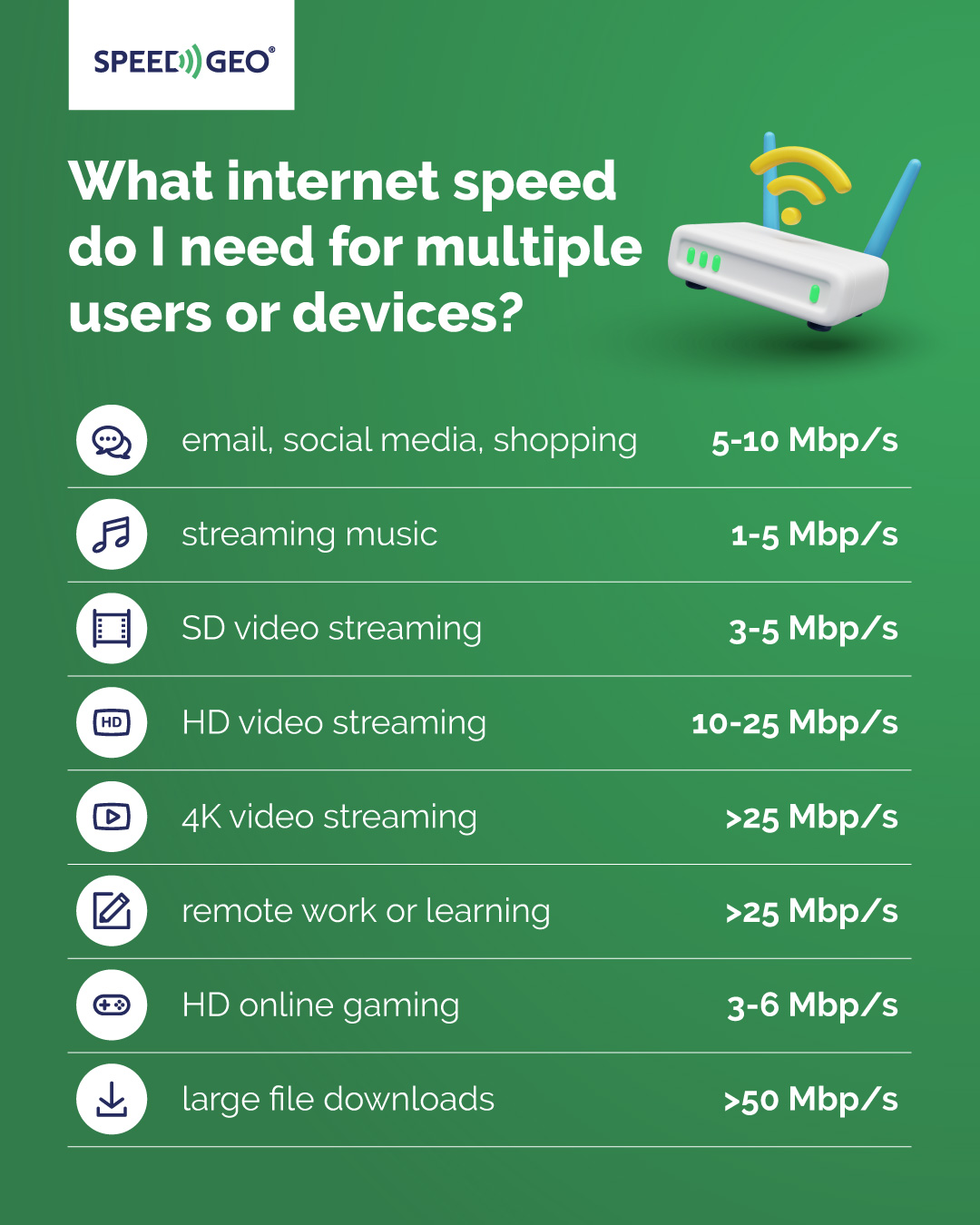
It’s important to pay attention to both download and upload speeds, as recommended by the FCC. Choosing an internet plan that matches your household’s habits and the number of people online will help you enjoy a fast, dependable connection.
What internet speed is best for streaming video and music?
The internet speed you need for streaming depends on both the video quality you want and the number of devices using the connection. For streaming music, each device typically requires less than 1 Mbps. Watching videos in standard definition generally calls for 3 to 4 Mbps per device, while high definition viewing bumps that requirement up to between 5 and 10 Mbps. If you’re aiming for seamless 4K streaming, it’s best to have at least 25 Mbps available for each device to avoid buffering and maintain crisp visuals.
|
Activity |
Recommended Speed per Device |
|
streaming music |
less than 1 Mbps |
|
standard definition (SD) video |
3–4 Mbps |
|
high definition (HD) video |
5–10 Mbps |
|
4K video streaming |
at least 25 Mbps |
As more devices stream at the same time, your overall bandwidth requirements increase. For instance, if two people are watching HD videos simultaneously, you’ll need a combined speed of 10 to 20 Mbps. In households where several users regularly enjoy HD or 4K content, opting for an internet plan with speeds of 100 Mbps or higher can help keep streaming smooth and minimize delays or interruptions.
Selecting the best internet speed comes down to how many devices will be streaming at once and the level of video quality you expect. Faster connections are also beneficial for activities like live streaming, video conferencing, and anything else that relies on a steady, reliable signal across multiple devices. Most internet providers offer a range of speed options, making it easier to find a plan that suits both your streaming needs and the number of people in your home.
What speed should I have for gaming and voice chat?
Online gaming places unique demands on your internet connection, making both speed and latency important factors. While many games can function with download speeds as low as 3 to 6 Mbps per device, having a faster connection-ideally 100 Mbps or higher-provides a much smoother experience. Higher speeds mean quicker downloads for game files and updates, as well as more stable multiplayer sessions. This is particularly beneficial for graphics-intensive titles or MMORPGs, where large updates and real-time interactions are common.
Latency, often referred to as "ping" and measured in milliseconds, is just as critical as raw speed. For optimal performance, aim for a ping under 50 ms (ideally less than 20 ms). Lower latency ensures your actions register instantly, reducing lag and making a big difference during fast-paced multiplayer matches. When it comes to voice chat, whether you’re using Discord or in-game communication, the bandwidth requirements are minimal-less than 1 Mbps is usually enough. However, a stable and low-latency connection is still essential to prevent audio glitches or delays during conversations.
If you plan to live stream your gameplay or host multiplayer sessions, upload speed becomes especially important. At least 3 Mbps upload is recommended to maintain a smooth stream and keep connections stable for other players. Investing in a gaming router with Quality of Service (QoS) features can further enhance your experience by prioritizing gaming and voice traffic, ensuring other devices in your home don’t interfere during peak usage.
- download speed of at least 100 Mbps for smooth gaming,
- ping under 50 ms for minimal lag, ideally less than 20 ms,
- upload speed of at least 3 Mbps for live streaming or hosting,
- gaming router with QoS to prioritize gaming traffic,
- managed WiFi solutions to optimize your wireless network.
In households where multiple people are gaming, streaming, or chatting online at the same time, it’s wise to choose an internet plan offering between 200 and 500 Mbps or more. This helps everyone stay connected without noticeable slowdowns. Managed WiFi solutions can also make a difference by optimizing your wireless network and minimizing disruptions, especially during busy hours. By selecting the right internet speed and setting up your network properly, you’ll enjoy reliable, lag-free gaming and crystal-clear voice chat—even when the whole household is online.
What internet speed is recommended for remote work or learning?
For remote work and online learning, an internet download speed of at least 25 Mbps is ideal. This ensures smooth video conferencing, seamless collaboration, efficient document editing, and quick file transfers. Upload speed is important as well-tasks like VoIP calls, unified communications, and accessing a VPN all rely on a strong upload connection. To maintain clear video calls you’ll want at least 3 Mbps for uploads. If you want to send large files you need a minimum of 25 Mbps for upload.
- smooth video conferencing,
- seamless collaboration,
- efficient document editing,
- quick file transfers,
- clear VoIP calls.
If multiple people in your household are working or attending classes online at the same time, it’s wise to look for a broadband plan offering 100 Mbps or higher. This helps prevent disruptions during meetings and keeps both download and upload speeds consistent. Homes with numerous connected devices or those handling business calls through SIP trunks will also benefit from faster internet packages.
A stable connection becomes even more crucial when using VPNs to securely reach company resources, as VPN tunnels can reduce your effective speed. Opting for a plan with balanced download and upload rates will help maintain smooth communication and speedy file transfers.
When choosing the right internet speed, consider how many people and devices will be online, as well as your need for video calls, file uploads, or cloud-based applications. For optimal performance, plan on at least 25 Mbps per person working or studying remotely. This helps minimize interruptions and keeps everyone productive throughout the day.
What internet speed do I need for multiple users or devices?
When multiple people or devices share a home network, higher internet speeds become essential to prevent lag and buffering. As your household expands and more gadgets connect simultaneously, your bandwidth requirements naturally increase. For example, a family of four who enjoys streaming movies, online gaming, and remote work all at once should look for at least 200-500 Mbps to ensure everyone experiences a seamless connection.
If your home is larger or packed with smart devices-think smart TVs, laptops, tablets, and home automation gear-you’ll likely benefit from even faster speeds. In these situations, gigabit plans like 1 Gig (1,000 Mbps) or even 2 Gig can provide a noticeable boost, especially when dozens of devices are online together.
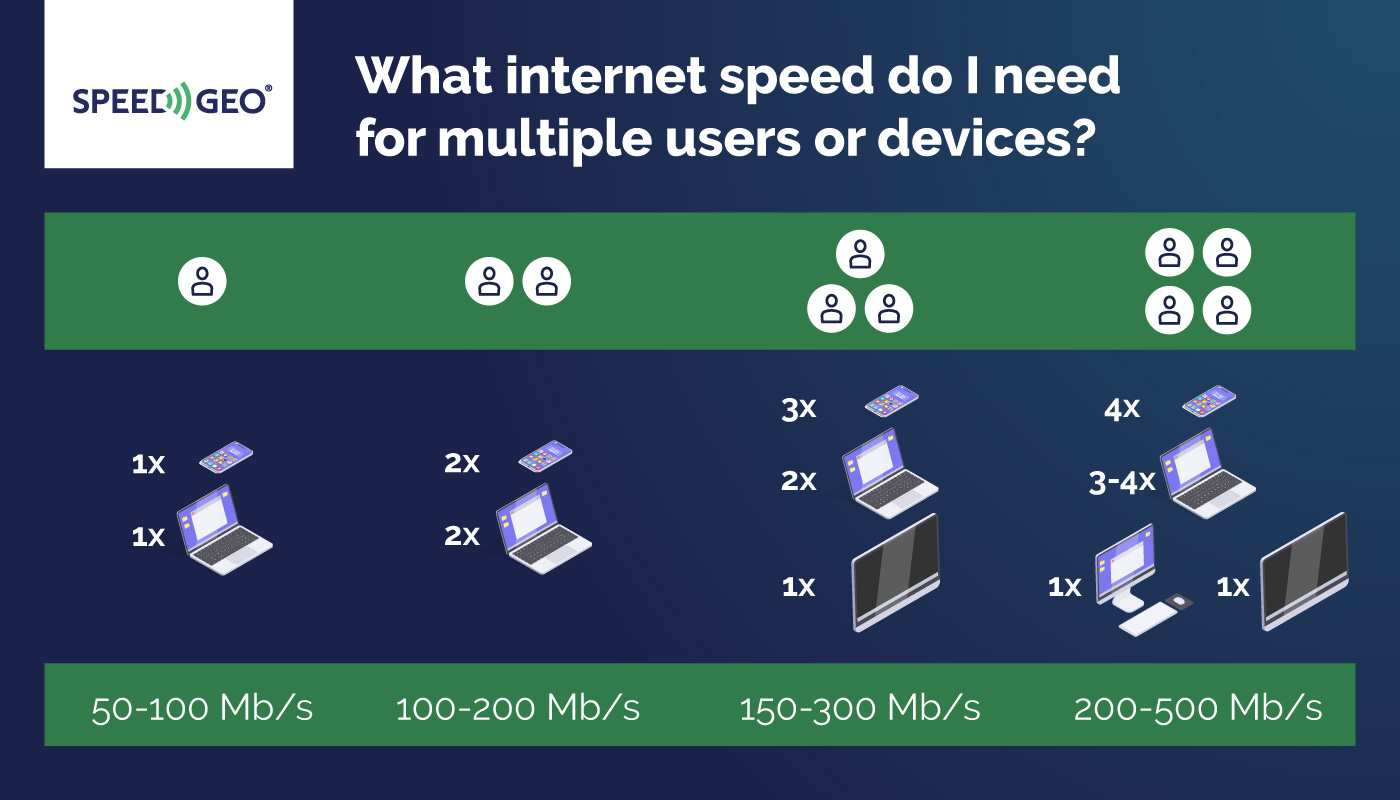
Every connected item—whether it’s a smartphone, laptop, gaming console, or smart speaker—draws from your available bandwidth. That’s why it’s important to select an internet plan that matches both the number of users and the types of online activities in your household. Activities such as 4K video streaming, video conferencing, and large file downloads can each consume over 25 Mbps per device. When several people engage in these tasks at once, your overall speed needs can climb quickly.
- streaming 4K video,
- video conferencing,
- large file downloads,
- online gaming,
- smart home device management.
To ensure strong coverage throughout your home, consider using whole-home Wi-Fi systems or extenders. Still, the overall quality of your network will depend on the speed provided by your internet plan.
Keep in mind that device capabilities also play a role. Outdated Wi-Fi standards or older hardware can bottleneck your connection, even if you’re paying for high speeds. Upgrading to a newer router or a mesh Wi-Fi system can help maintain consistent performance in every room. For households with heavy internet use—like online classes, multiple video streams, and smart home management—gigabit or fiber-optic options are often the most effective.
To find the best plan, add up the estimated speed requirements for all devices that might be in use at the same time. Choose a package that meets or exceeds this total. For most average-sized homes, speeds between 100 and 300 Mbps are typically sufficient. However, if you have a bigger family or more than ten devices, it’s wise to consider plans ranging from 500 Mbps up to 2 Gig. This approach helps ensure fast, dependable internet access throughout your entire home.
What factors can affect my actual internet speed?
Paying for a high-speed internet plan doesn’t always guarantee you’ll experience those top speeds. Several technical and environmental elements can influence your actual connection. One common culprit is network congestion. When lots of people in your area are online at the same time-especially during peak hours-everyone has to share the available bandwidth, which often results in slower speeds than your provider promises.
The equipment you use at home also plays a significant role. Outdated or low-quality modems and routers can bottleneck your connection, regardless of how fast your service is supposed to be. For a more reliable and faster experience, connecting your device directly to the router with an Ethernet cable is usually best. This setup sidesteps issues like signal interference and the limited range that can plague Wi-Fi. Wireless signals can also be disrupted by walls, electronic devices, or even neighboring Wi-Fi networks.
- network congestion during peak hours,
- outdated or low-quality modems and routers,
- distance from your router and physical obstacles,
- multiple devices sharing bandwidth,
- intentional throttling by providers.
How far you are from your router matters, too. The greater the distance, or the more obstacles between your device and the router, the weaker your wireless signal, which can slow things down. If multiple people or devices are using the internet at once, the bandwidth gets divided, leading to reduced speeds for everyone.
Some providers intentionally slow down connections, a practice known as throttling. This often happens during busy periods or when certain types of data are being used. Running speed tests at different times can help you spot patterns and determine if throttling might be affecting you.
Unstable connections can also result from interference, outdated hardware, or physical barriers within your home. Upgrading your equipment and following your provider’s recommendations can resolve many of these issues. Wired connections, in particular, tend to bypass many of the problems associated with Wi-Fi, allowing you to make the most of your internet plan.
Regularly checking your internet speed and using troubleshooting resources from your provider can help ensure you’re getting the service you’re paying for. If your speeds are consistently lower than expected, examining these factors can help you identify and address the root of the problem.
What steps can improve my internet speed and connection quality?
Enhancing your internet speed and connection quality starts with making smart choices about your home network setup. For devices that demand the most reliability—such as desktop computers, gaming consoles, or workstations—using a wired Ethernet connection is ideal. Ethernet cables deliver steady, dependable speeds and aren’t susceptible to the interference that often disrupts Wi-Fi.
For your wireless network, the placement of your modem and router is crucial. Position them in a central, open location to maximize coverage and minimize dead zones. Avoid placing your equipment near thick walls, bulky metal objects, or other electronic devices, as these can weaken or block the signal.
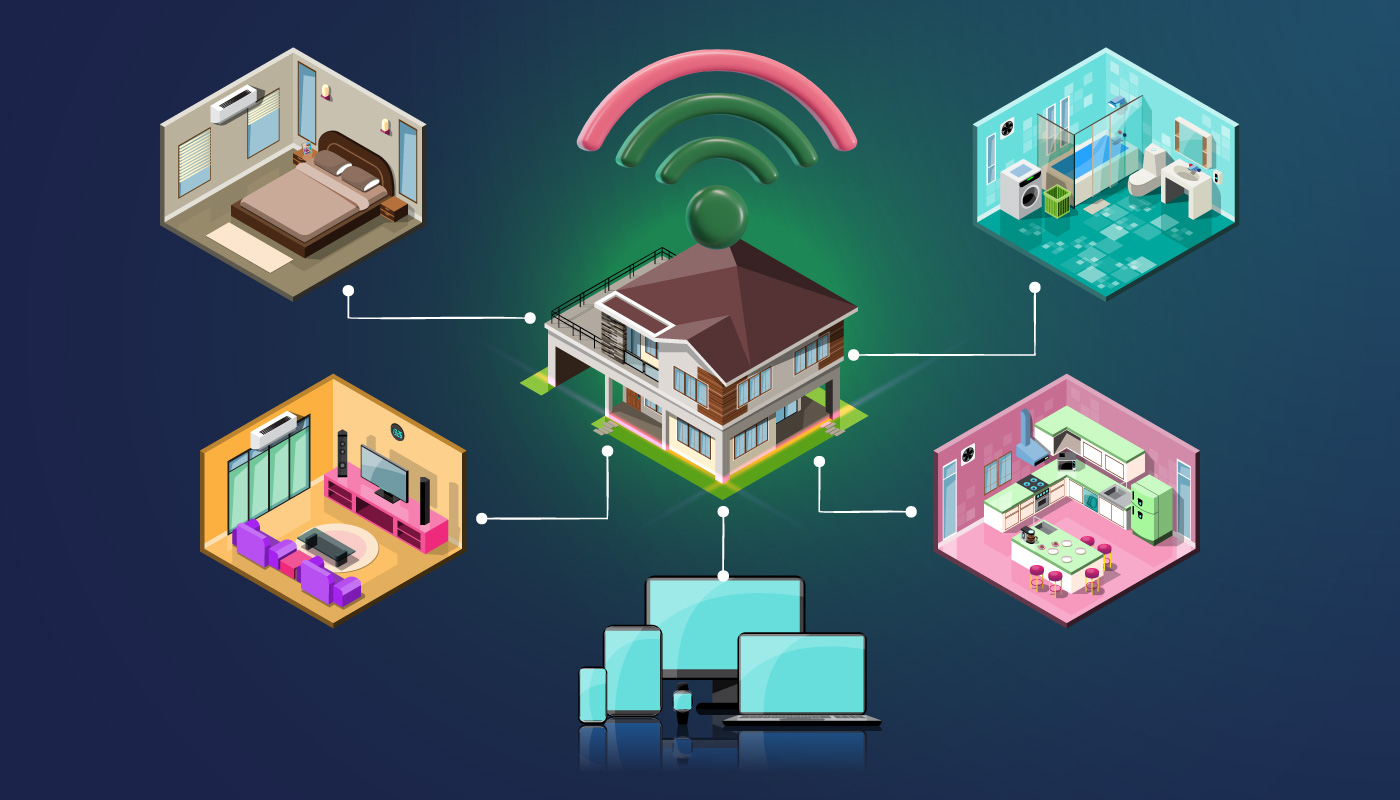
If your modem or router is outdated, consider upgrading to newer models. The latest devices support faster Wi-Fi standards, accommodate more users, and provide stronger performance throughout your home. Managed network solutions and managed Wi-Fi systems are also worth exploring, as they help distribute bandwidth more effectively across all your devices.
- limiting the number of connected devices can further boost your network’s performance,
- disconnect or pause gadgets you’re not actively using, especially during peak hours,
- in larger homes or areas with spotty Wi-Fi, adding extenders or a mesh system can eliminate dead zones and ensure a robust signal in every corner.
Regular upkeep is essential. Restarting your modem and router periodically helps clear minor glitches and refresh your connection. Keeping firmware and software updated is equally important, since updates often include valuable improvements for speed and security.
- if you notice your internet is lagging behind what your plan promises, double-check your subscription with your provider,
- you may need to upgrade to a faster package,
Take advantage of troubleshooting resources and guides from your provider to resolve persistent issues. Make sure your router has plenty of breathing room and isn’t crowded by other electronics to prevent interference.
By upgrading your equipment, optimizing placement, minimizing unnecessary device connections, and choosing wired options when possible, you’ll likely notice a marked improvement in both speed and reliability. These strategies, along with selecting the right internet plan, can help everyone in your household enjoy a fast, stable connection.